# Struggling with font
**URL:** https://community.penpot.app/t/struggling-with-font/9904
**Category:** Ask the community
**Created:** [September 26, 2025, 2:05pm UTC](https://community.penpot.app/t/struggling-with-font/9904 "2025-09-26T14:05:25Z")
**Posts on this page:** 10
**Page:** 1
### Author:  [@romu](https://community.penpot.app/u/romu)
#### Post date: [September 26, 2025, 2:05pm UTC](https://community.penpot.app/t/struggling-with-font/9904/1 "2025-09-26T14:05:25Z")
Hi there.
I’m moving a design from Figma to PenPot. And I’m struggling with font rendering.
Check out the attached image. I don’t get why the right arrow, with a character with the Noto Sans font is not vertically centered.
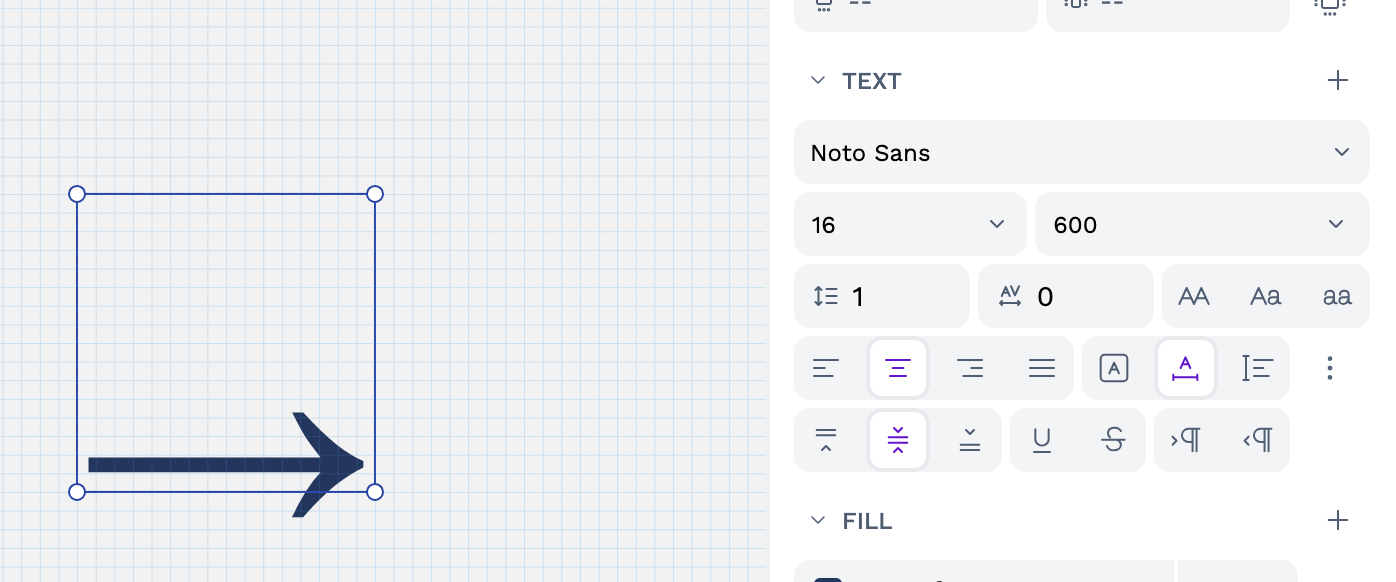
Do I do something wrong? How can I fix this?
Thanks.
---
### Author:  [@schnesen](https://community.penpot.app/u/schnesen)
#### Post date: [September 29, 2025, 7:35am UTC](https://community.penpot.app/t/struggling-with-font/9904/2 "2025-09-29T07:35:33Z")
Hej @romu,
I don’t have an immediate solution for your problem but some thoughts. Maybe they help.
1. I’m not sure if this is an arrow from the Noto Sans font. Usually, they look different (more straight) then the one in your image. Maybe something got wrong during copying them from Figma.
2. There a glyphs which are not center alligned. E.g diacrytical marks (the little accent things above some letters like here: è) are above the letters. Some are also “below” the baseline of the font. Maybe the arrow in your picture is a “below arrow” glyph.
These are just some thoughts. If you can share a file where this problem occurs it’s easier to have a closer look.
Ciao,
Sven
---
### Author:  [@romu](https://community.penpot.app/u/romu)
#### Post date: [September 29, 2025, 8:14am UTC](https://community.penpot.app/t/struggling-with-font/9904/3 "2025-09-29T08:14:33Z")
Hi Sven.
Thanks for the help.
I can’t upload a document, I’m too new on this forum. But here is my process to reproduce:
- I type the right arrow in a right document editor (I’m on mac, so it’s Control+Cmd+Space shortcut), in my case, I use Notion
- I copy/paste this character from Notion to PenPot, and adjust the font settings (Noto Sans, etc).
Hope this helps. Thanks again.
---
### Author:  [@schnesen](https://community.penpot.app/u/schnesen)
#### Post date: [September 29, 2025, 8:36am UTC](https://community.penpot.app/t/struggling-with-font/9904/4 "2025-09-29T08:36:40Z")
Interesting…for me the Control+Cmd+Space (on a Mac) shortcut opens the emoji viewer for me. Maybe this shortcut has a special function in Notion. In this case, I doubth that it will insert a correct arrow glyph but more a generic symbol. Maybe I’m wrong.
You could try to change the font of the arrow. If it’s a glyph it should update its appearrance corresponding to the selected font. If its a symbol it should keep its appearrance. 🤷
---
### Author:  [@findut](https://community.penpot.app/u/findut)
#### Post date: [September 29, 2025, 8:49am UTC](https://community.penpot.app/t/struggling-with-font/9904/5 "2025-09-29T08:49:08Z")
Hi everyone,
I’m sharing a resource that’s solved many problems for me on many projects, and this situation might be a good fit!
> **[decodeunicode.org](https://decodeunicode.org/)**
---
### Author:  [@romu](https://community.penpot.app/u/romu)
#### Post date: [September 29, 2025, 9:01am UTC](https://community.penpot.app/t/struggling-with-font/9904/6 "2025-09-29T09:01:11Z")
Yes, same to me, it opens the emoji viewer. But they are real characters. If I change the font from Noto Sans to another, I see the arrow changing as well.
And thanks to the @findut link, you can see the right arrow character is U+02192.
But that doesn’t fix the rendering problem 😉.
---
### Author:  [@schnesen](https://community.penpot.app/u/schnesen)
#### Post date: [September 29, 2025, 9:31am UTC](https://community.penpot.app/t/struggling-with-font/9904/7 "2025-09-29T09:31:20Z")
The unicode designation helps a lot. I just checked the Arrow glyph on the [https://fonts.google.com/noto/specimen/Noto+Sans](https://fonts.google.com/noto/specimen/Noto+Sans) type tester. It seems that Noto Sans doesn’t have arrows in its glyphs set. So my guess still persists that the arrow you see in Penpot can’t be the correct one from Noto Sans because it doesnt exist.
Does the problem still exists with the U+02192 glyph from other fonts?
I hope my feedback and comments still make sense to you and help. If not just let me know. 🙂
---
### Author:  [@romu](https://community.penpot.app/u/romu)
#### Post date: [September 29, 2025, 10:30am UTC](https://community.penpot.app/t/struggling-with-font/9904/9 "2025-09-29T10:30:57Z")
Thanks to both of you. It was really helpful. So, I’ll change the font from Noto Sans to another one which includes the right arrow glyph, or…replace the glyph by another one.
---
### Author:  [@romu](https://community.penpot.app/u/romu)
#### Post date: [September 29, 2025, 10:38am UTC](https://community.penpot.app/t/struggling-with-font/9904/10 "2025-09-29T10:38:23Z")
Fun fact, Noto Sans has the left arrow glyph. But, same thing, the glyph is not vertically centered even on Google Font, it’s still located at the bottom of the area.
Another fun fact: copy the left arrow glyph from Google Font and paste it into PenPot → Crash!
---
### Author:  [@schnesen](https://community.penpot.app/u/schnesen)
#### Post date: [September 29, 2025, 1:53pm UTC](https://community.penpot.app/t/struggling-with-font/9904/11 "2025-09-29T13:53:45Z")
🤣 great findings. That’s awesome!